
Short answer: Most LiftMaster remote and keypad problems come down to one of three things: a dead or dying battery, a remote that fell out of sync with the opener’s memory, or a keypad that needs its code re-entered after a power blip. All three are a five-minute fix once you know which one you have. Here is how to sort it out.
Programming a LiftMaster remote
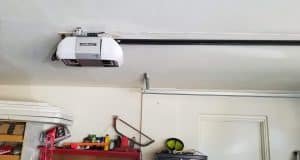
- Find the Learn button on the opener unit itself, the motor head mounted on your garage ceiling. On most models it is a purple, orange, or yellow button on the back or side panel
- Press and release the Learn button. An indicator light near it will glow for about 30 seconds
- Within that 30 seconds, go to your remote and press and hold the button you want to program until the opener’s lights blink or you hear it click
- Test it. Press the remote button from a normal distance. If the door does not respond, repeat the process, the 30-second window is easy to miss on the first try
If you are programming more than one remote, repeat the whole process for each one. Each remote needs its own Learn cycle.
Programming a LiftMaster keypad
- Press the Learn button on the opener the same way as above
- On the keypad, enter a 4-digit PIN of your choosing, then press Enter
- The opener’s lights will blink, confirming the code is saved
- Test the code from outside before relying on it
If the keypad already worked before and suddenly stopped, reprogramming is rarely the actual fix. Check the battery first, that is what fails most often.
Battery replacement
Most LiftMaster remotes use a 3-volt coin battery (CR2032 or CR2016 depending on the model), and most keypads use a 9-volt or a pair of AAs behind a small cover on the back. Swapping the battery does not erase the remote’s programming, so you should not need to reprogram anything after a battery change. If the remote or keypad stops working entirely right after a battery swap, double-check the battery is seated the right way round before assuming it needs to be reprogrammed.
Troubleshooting: it still is not working
- Remote does nothing at all, even close to the opener. Almost always the battery. Replace it before trying anything else
- Remote worked yesterday, does nothing today, battery is fine. The opener’s memory may have been cleared, sometimes by holding the Learn button too long during an unrelated task. Reprogram it
- Keypad lights up but the door does not respond. The code may have been cleared from the opener’s memory even though the keypad itself still works. Reprogram the code
- Range has gotten noticeably shorter over time. Usually a weak battery, occasionally interference from a newer LED bulb near the opener. Try a battery first, it is the cheaper fix
- Nothing above works. The opener’s receiver itself may have failed, which is a different repair and worth having looked at rather than replacing remotes one at a time
Frequently asked questions
Why did my LiftMaster remote stop working after a power outage?
The opener’s programming is stored in its own memory and normally survives a power outage. If the remote stopped working right after one, it is more often a coincidence with the battery dying than something the outage actually caused. Check the battery before reprogramming.
How many remotes can a LiftMaster opener hold in memory?
Most residential LiftMaster models store dozens of remote and keypad codes, far more than a household needs. You will not run out of memory from normal use.
Can I use a universal remote instead of a LiftMaster one?
Yes, most universal remotes support LiftMaster’s rolling code system and program the same way, using the Learn button. Check the remote’s packaging for LiftMaster compatibility first.
What do I do if the Learn button does not seem to be working?
Confirm you are pressing it within the correct window and holding the remote close to the opener. If the indicator light near the Learn button does not turn on at all when pressed, that points to a problem with the opener’s circuit board rather than the remote, which is worth having a technician look at.
Still stuck?
If you have tried the battery and the reprogramming steps above and your LiftMaster remote or keypad still is not cooperating, the issue is likely in the opener itself. Call Discount Door Service at (520) 579-9084 or request service online, and our LiftMaster opener repair team can take a look same-day.